codeSpark - Coding for Kids
- 3.5
- Rating
- 1.00M
- Installs
- Free
- Price
 Analysis by App-foxy
When I tried codeSpark - Coding for Kids, I found a game that works best as a short, guided activity rather than something a child simply opens and plays for hours. It turns basic programming ideas into puzzles, stories, and creative tasks aimed at children from three to ten. That age range is wide, so my experience is that the same app can feel like a gentle introduction for one child and a little too simple for another.
The biggest appeal is that it makes coding look like play. Instead of beginning with a keyboard, complex terminology, or a blank project, the child meets visual challenges that encourage planning and problem-solving. I could see why it has passed the one-million-install mark and attracted an average rating of 3.5 from roughly thirteen thousand ratings. Those figures suggest broad interest, but they also hint that this is not a perfect fit for every family or every learner.
How it works on a shared household device
In a home with more than one child, the practical question is not only whether the game is educational. It is also whether the experience remains comfortable when siblings take turns on the same phone or tablet. I would use it in a calm window after school, with one child completing a puzzle while an adult stays nearby for the first few sessions. That arrangement makes the activity feel like a shared challenge instead of another unattended screen.
You May Also Like

 Blood Strike: 2.5 Anniversary
Blood Strike’s Loadouts Turn Every Drop Into a Tactical Gamble
A close look at Blood Strike’s custom loadouts: how fast access to signature weapons reshapes its battle royale rhythm, rewards preparation, and narrows the gap between fights.

 Pandora - Music & Podcasts
Pandora’s Music Is Easy to Start, but Harder to Recover
Pandora’s strength is its low-effort path from a seed to a station. Its weak spot is how much confidence it asks you to place in connection, setup, and quiet recovery.

 8 Ball Pool
 Is Built on Rivalries, Rematches, and Routine
A close look at the rivalries, rematches, shared routines, and unanswered safety questions that turn a quick pool match into a persistent mobile community.

 Samsung Music
’s Quiet Strength Is Playing What You Already Own
Its reach comes less from spectacle than from dependable access to a personal library. That simplicity is both the app’s strongest retention engine and its ceiling.

 AccuWeather: Weather Radar
AccuWeather Review: A Quick, Clear Forecast for Everyday Decisions
For everyday plans, the best forecast is the one you can understand quickly. AccuWeather makes rain timing, radar, and local conditions easy to act on, with a few trade-offs.

 Hill Climb Racing
Why Hill Climb Racing Still Turns Crashes Into One More Run
A tiny car, a bumpy hill and one more upgrade: Hill Climb Racing keeps resurfacing because its simple chaos makes every near-miss feel personal.
More From Our News Desk



A realistic routine might be a younger child trying a few visual coding puzzles before dinner, followed by an older sibling exploring a creative activity on the same device. The children can discuss why a character moved the wrong way or how a sequence could be shorter. That conversation is where much of the learning happens. The game supplies the immediate challenge, while the adult can turn mistakes into questions rather than simply correcting them.
Shared-device use also exposes a limitation: the app is not automatically a complete family learning system. I would not assume that every child will have the same pace, interests, or level of independence. A three-year-old may need help understanding the interface and the goal of a puzzle, while a ten-year-old may want more freedom than the introductory activities provide. I recommend agreeing on whose turn it is and what kind of activity each child is choosing before handing over the device.
That small bit of coordination prevents a common problem with educational games: one child rushes through the easiest material while another is left waiting. I found the app more useful when the adult treated it as a collection of activities to discuss, not as a digital babysitter. Even a brief question such as “What do you think will happen next?” can make the child explain the logic behind an answer.
What the child is actually learning
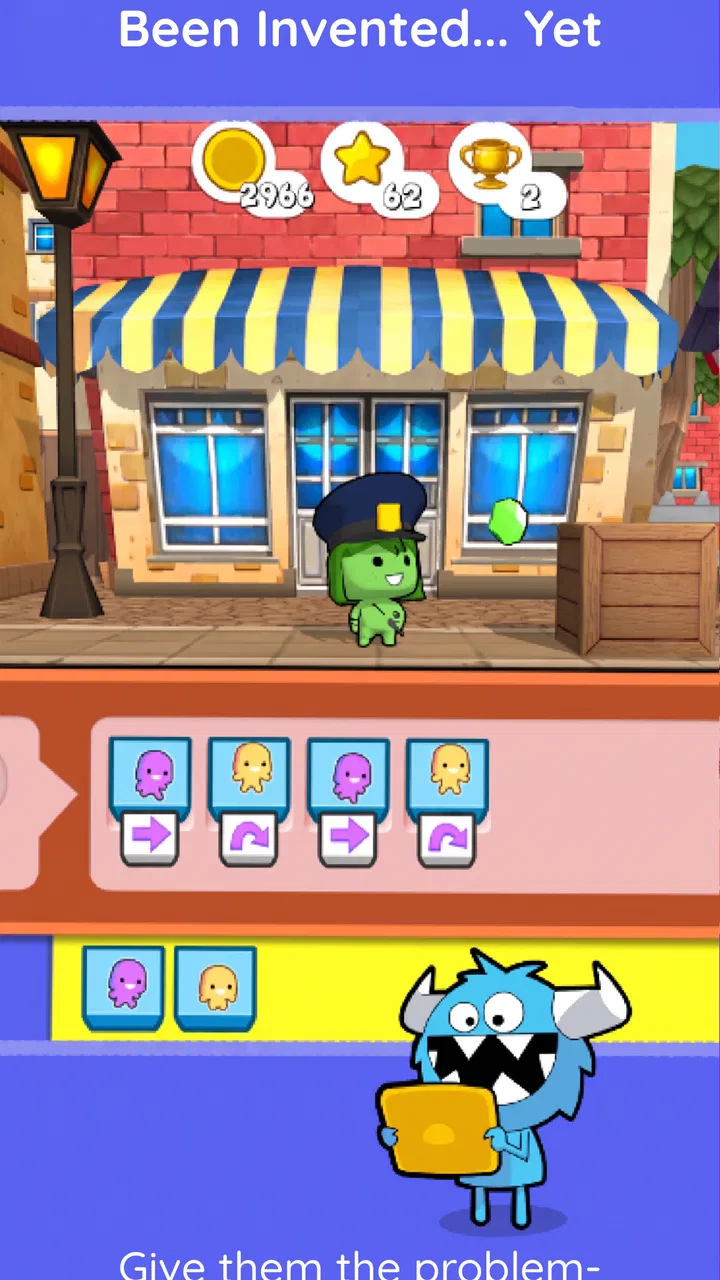
The learning comes through arranging instructions and observing results. A child begins to connect order, cause, and effect: if an action is placed before another action, the result changes. That sounds simple, but it is an important foundation for later work with code. The visual format reduces the intimidation that often comes with text-based programming, especially for a child who is still developing reading confidence.
I also liked the way this kind of activity can make failure useful. When a sequence does not work, the child has a concrete result to inspect. The next step is not memorizing a definition; it is trying a different arrangement and seeing whether the outcome improves. Parents can reinforce that habit by asking the child to predict the result before pressing play.
There is a trade-off, though. Visual puzzles can teach programming logic without automatically teaching a child how to write conventional code. If your goal is to prepare an older learner for a text-based language, this is a starting point rather than a full curriculum. I would pair it with drawing a simple sequence on paper or explaining the steps aloud, so the child learns that the same thinking can exist away from the screen.
Setting up sensible boundaries before play
The game is free to download, but it includes in-app purchases ranging from $3.99 to $119.99 per item. That makes the household setup important, particularly when children use a device connected to an adult’s store account. Before letting a child explore independently, I would check the device’s purchase protections and make sure the adult knows which account is active. This is not a criticism of the coding activities themselves; it is simply sensible preparation for any free app with optional paid content.
I would also decide whether the child is allowed to choose activities freely or whether the adult will suggest a particular path. Younger children often benefit from a narrow choice, such as selecting between two puzzles, because an open collection can be distracting. Older children may enjoy browsing more independently, but I would still ask them to explain what they are trying to learn rather than judging the session only by how long they remain engaged.
The age label is Everyone, and the intended audience is children from three to ten. I would treat those details as a starting point, not a guarantee that every part will suit every child in that range. Developmental differences are substantial at these ages. A preschooler may need an adult to read or interpret instructions, while a child near the upper end may expect more challenge and creative control.
One useful boundary is to separate “practice time” from “free exploration.” During practice, I would encourage the child to slow down, predict, and explain. During exploration, I would let the child experiment without interrupting every mistake. This two-mode approach keeps the activity from becoming a test and gives the child room to discover patterns independently.
Keeping accounts and turns clear
For a shared tablet, I would write down a simple household rule: each child pauses at a natural stopping point and tells the next player what they were doing. That avoids confusion when one child changes the activity another child was exploring. If the app presents progress or content in a way that feels personal, I would avoid assuming that one shared session represents both children equally; the adult should observe who completed what.
I would not create several accounts or promise separate progress tracking unless the current setup clearly offers it. Instead, I would use a small notebook or a family checklist to record favorite activities and questions. That may sound old-fashioned, but it gives siblings a visible way to compare ideas without turning the device into a competition.
This is also a good place to discuss purchases. A child should know that “free” does not mean every item inside the app is free. I would explain that any paid decision belongs to the adult and that asking first is part of using the tablet responsibly. That conversation is more valuable than simply hiding the purchase process, because it teaches a basic digital habit that will matter with other apps too.
Coordinating learning instead of leaving the app to do everything
codeSpark is strongest when an adult occasionally joins in. I do not mean sitting beside the child for every puzzle. A better approach is to check in at the beginning, let the child work, and return when the child reaches a confusing challenge or wants to show a result. That keeps the child’s ownership intact while providing enough support to prevent frustration from ending the session.
I found three questions especially useful: “What is the character supposed to do?”, “Which instruction changes the result?”, and “What could you remove?” The last question is particularly important because it encourages efficient thinking rather than simply adding more commands. These prompts turn a quick game into a small reasoning exercise without making it feel like homework.
For siblings, cooperation can be more productive than competition. One child can describe the plan while the other places the actions, then they can swap roles. This works well when one child is confident with the interface and the other is better at spotting patterns. It also exposes whether a child understands the solution or is only tapping until something works.
Teachers and caregivers could use the same method in a small group, but I would keep expectations realistic. A single device is not ideal for several children who all want to control it at once. The app may support a short demonstration or turn-based activity, yet the adult would need to organize the group carefully. For home use, one or two children is a much more manageable setting.
Another useful workflow is to move the learning off-screen after a session. Ask the child to create a route for a toy, draw instructions for a family member, or describe the steps for making a snack. The point is not to pretend those tasks are part of the game; it is to help the child recognize sequencing in ordinary life. This is one of the less obvious ways to get more value from a visual coding app.
When the child gets stuck
Some children respond to a failed attempt by experimenting, while others immediately ask an adult for the answer. I would avoid taking over the device. Instead, ask the child to identify the first moment when the result differs from the plan. That narrows the problem and reinforces debugging, which is one of the most useful habits coding activities can introduce.
If the child is repeatedly frustrated, I would shorten the session rather than pushing through. Educational value drops quickly when the child is only guessing or waiting for an adult to solve the puzzle. A successful stopping point can make it easier to return later with a fresh attitude. The game is better suited to regular, modest sessions than to a long challenge designed to prove persistence.
Parents should also watch for the opposite issue: a child who completes easy tasks quickly but is no longer thinking about them. In that case, ask for an explanation, a shorter solution, or a prediction before the next attempt. If the activities still feel too basic, a more advanced programming platform may be a better next step than expecting this app to stretch indefinitely.
Age, trust, and choosing the right child for it
The Everyone rating makes the game approachable for a broad household, but trust still depends on supervision and the child’s habits. I would be comfortable introducing it to a young child with an adult nearby, especially during the first sessions. I would be more cautious about handing over a connected device and walking away, not because the coding concept is unsuitable, but because children differ in how they handle purchases, switching activities, and asking for help.
For preschoolers, the main benefit is the language of sequence and cause. They may not describe an algorithm formally, but they can learn that instructions need an order. Their sessions should be short, with an adult translating unfamiliar ideas into everyday language. For early elementary children, the game can become a more independent puzzle space, particularly if they enjoy stories, characters, and trial-and-error challenges.
For older children, the question is whether the playful presentation still feels rewarding. Some will appreciate the creative side and enjoy showing their solutions. Others will quickly want to build something more open-ended or type real code. In that second case, I would use this app only as a gentle warm-up and move toward a platform that offers deeper projects, more control, or a clearer bridge to conventional programming.
I would also skip it for a child who strongly dislikes repeating attempts or who needs a very explicit lesson structure. The game’s appeal comes from exploration, and a child who wants every rule explained before acting may find the trial-and-error format uncomfortable. Likewise, families looking for a complete school-style course with formal assessments should choose a more structured educational product.
The developer is codeSpark, and the game has been available since November 3, 2014. Its current version is 4.30.01 and it requires Android 5.1 or later. Those details matter in a household with an older tablet: I would check compatibility before planning a shared learning routine, especially if the device is kept for children because it is no longer used for adult work.
How it compares with usual coding alternatives
Compared with text-based coding lessons, this game is much less intimidating for young children. There is no need to begin with spelling commands, punctuation, or a blank editor. That makes it a better first contact for a child who is curious but not ready to read long explanations. The compromise is that the child may understand the logic without yet learning how programmers express it in a text language.
Compared with block-based creative tools, it is more guided. A block editor can offer greater freedom, but that freedom can leave a beginner wondering what to build or why a project failed. Here, the puzzle structure supplies a clear goal. On the other hand, children who already enjoy designing their own games may outgrow guided tasks and prefer an environment where they can invent the rules.
Compared with coding videos, the game is more interactive because the child must make choices and observe consequences. Videos can explain ideas clearly, but they often encourage passive watching. I would choose this app when I want the child to practice a concept immediately. I would choose a video or a book when the child needs a slower explanation, a story about how coding works, or a reference they can revisit without solving a puzzle.
Compared with worksheets, the game gives faster feedback and makes mistakes visible through action. Worksheets are easier to print, share, and use without a device, but they may not provide the same immediate sense of cause and effect. My preferred routine would combine them: use the app for experimentation, then ask the child to draw or explain the solution away from the screen.
No alternative is automatically better. The right choice depends on whether the child needs structure, creativity, reading practice, or a path toward real programming syntax. This game earns its place at the beginning of that journey, especially when the household wants something more active than a video but less demanding than a full coding environment.
My household verdict
I recommend codeSpark for families seeking a friendly first step into programming ideas, particularly when an adult is willing to help with setup, turns, and occasional discussion. Its free entry point makes it easy to try, and the broad age rating makes it plausible for a shared family device. The educational focus is clear without making the child sit through a conventional lesson.
I would not present it as a complete coding education or assume that one installation will satisfy children at very different stages. The paid-content range means adults should establish purchase boundaries before handing over the device, and the wide target age means supervision needs to change as the child grows. Those are manageable issues, but they should be part of the decision.
My final judgement is positive with limits: this is a useful puzzle-based introduction, not a replacement for deeper creative coding tools. Start with short sessions, ask the child to predict and explain, and keep a simple record when siblings share the device. Used that way, the game can turn a spare ten minutes into genuine practice with sequencing, debugging, and clear thinking. If your child is ready to build larger personal projects or learn text-based programming, treat it as a stepping stone and move on when the guided format stops being challenging.
FAQs for codeSpark - Coding for Kids
01What is codeSpark - Coding for Kids?
codeSpark - Coding for Kids is an educational app designed to teach children ages 5-9 the fundamentals of coding through engaging games and interactive puzzles. It uses a visual programming language that requires no reading, making it accessible for young learners to develop problem-solving skills and creativity.
02Do I need any prior coding knowledge for my child to use the app?
No prior coding knowledge is required for your child to start using codeSpark. The app is designed for beginners and uses a step-by-step approach to introduce basic coding concepts. Each level builds on the previous one, ensuring a gradual learning curve that is easy for children to follow.
03Is codeSpark safe for my child to use?
Yes, codeSpark is designed with child safety in mind. The app is ad-free and does not require personal information from children. It also features a secure, child-friendly environment that parents can trust, with parental controls to monitor and manage their child's progress and activity.
04What devices are compatible with codeSpark?
codeSpark is available on a variety of devices, including tablets and smartphones running on both Android and iOS platforms. It is optimized to ensure a smooth user experience across different screen sizes, making it versatile for use at home or on the go.
05Are there any subscription fees or in-app purchases?
codeSpark offers a free trial to allow users to explore the app's features. After the trial, a subscription is required to access all content and features. The app offers different subscription plans, and parents can choose the one that best fits their needs. There are no hidden costs or in-app purchases.
Pros
- Engaging and colorful interface.
- No reading required for young users.
- Promotes logical thinking skills.
- Includes a variety of coding challenges.
- Safe
- ad-free environment.
Cons
- Limited content in free version.
- Requires internet for new content.
- Some activities can be repetitive.
- May not challenge older kids.
- Subscription can be pricey.

codeSpark - Coding for Kids
Gallery